
A chronograph measures arrow speed so you can record your own bow-and-arrow setup instead of relying only on advertised bow specifications. It can help you compare compatible arrows, document equipment changes, and review a series of shots under consistent conditions.
The best archery chronograph depends on where you shoot, how much setup you want to do, and whether you need phone connectivity. Radar and optical models have different placement requirements, so consider the complete setup before choosing.
These selections are based on manufacturer specifications and manuals, rather than hands-on comparative testing. Amazon links are searches; confirm the exact model, seller, and bundle.
Quick Comparison
Table of Contents
| Chronograph | Technology | Main reason to compare it | Important check |
|---|---|---|---|
| Garmin Xero C2 | Radar | Compact design and ShotView records | Bow-mode positioning |
| ProChrono DLX | Optical | Built-in Bluetooth | Indoor lighting accessory |
| Caldwell G2 | Optical | Inverted sensors and LED lighting | Kit contents and app support |
| LabRadar LX | Radar | Rechargeable design and shot statistics | Firmware and triggering |
| Caldwell Ballistic Precision G2 | Integrated | chronograph with built-in lighting features. | self-contained LED lights |
1. Garmin Xero C2 — Best for Compact Radar Recording
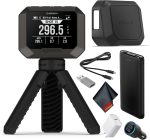
The Garmin Xero C2 is worth considering if portability and organized shot records are priorities.
Introduced in January 2026, it supports arrows within an advertised overall projectile-speed range of 100–5,000 feet per second, connects to the ShotView app, and uses a rechargeable battery. Garmin advertises up to six hours of operation.
For archery, dedicated bow sessions and reviewing recorded shots are more relevant than its high maximum-speed specification.
 Why consider it:
- Compact radar format.
- Dedicated bow-session workflow.
- ShotView records and session comparison.
Check before buying: Read the current bow-specific placement instructions and confirm support for your expected arrow speed. Check bow-mode target-distance requirements rather than applying firearm instructions.
2. Competition Electronics ProChrono DLX — Best for Bluetooth on an Optical Model
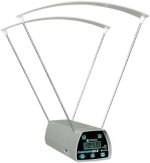
The ProChrono DLX is a practical option if you want an optical chronograph with wireless phone records.
Competition Electronics lists archery support, built-in Bluetooth, onboard shot-string memory, and statistics. Its Digital Link app supports compatible iOS and Android devices. The manufacturer quotes ±0.5% accuracy or better. A separately supplied 9V battery is required, and optional lighting is recommended indoors.
 Why consider it:
- Bluetooth connection to a compatible phone.
- Onboard records and statistics.
- Replaceable battery.
Check before buying: Include indoor lighting in your budget if needed. Verify the export process: the current manual says units manufactured from 2024 onward cannot connect directly to the desktop Digital Link app over Bluetooth. Mobile-file transfer is an alternative.
Amazon link: Amazon.com : Competition Electronics ProChrono DLX Chronograph White : Sports & Outdoors
3. Caldwell Ballistic Precision G2 — Best for Integrated Optical Lighting Features
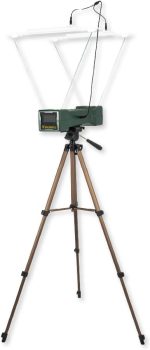
The Caldwell G2 is worth comparing when you want an optical design with lighting built into the system.
Caldwell specifies an inverted sensor arrangement, 18-inch sensor spacing, and sunscreens with self-contained LED lights. Its published measurement range is 5–9,999 fps, with manufacturer-stated factory calibration accuracy of ±0.25%. Caldwell also describes app-based recording and shot statistics. Caldwell
These specifications come from Caldwell and should not be treated as a controlled accuracy comparison with the other models.
 Why consider it:
- Integrated LED lighting features.
- Inverted optical sensor layout.
- App-based records and statistics.
Check before buying: Confirm kit contents, power requirements, and current phone-app support. Follow bow-specific setup instructions and allow clearance for the complete arrow, including its fletching.
4. LabRadar LX — Best for Comparing Radar Data Features
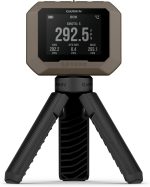
LabRadar LX is another radar option explicitly marketed for bows and crossbows.
The manufacturer lists an internal rechargeable battery, Bluetooth, integrated memory, and statistics including average speed, extreme spread, and standard deviation. Labradar
Its published manual identifies an archery mode covering 66–600 fps. Operating modes and triggering behavior can change with firmware, so use instructions matching the installed version.
 Why consider it:
- Rechargeable radar design.
- Stored shot-series statistics.
- Bluetooth app connection.
Check before buying: Confirm bow compatibility, firmware, placement, and whether your setup needs an approved external trigger. Do not substitute instructions for the original LabRadar or LabRadar Lite.
5. Caldwell Ballistic Precision G2 — Best for Integrated LED Lighting
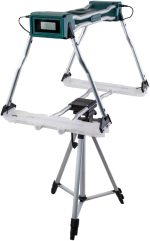
The Caldwell Ballistic Precision G2 is worth considering if you want an optical chronograph with built-in lighting features.
Caldwell specifies an inverted sensor layout, 18-inch sensor spacing, and self-contained LED lights in the sunscreens. It lists a measurement range of 5–9,999 fps and manufacturer-stated factory calibration accuracy of ±0.25%. Caldwell
Its app can record shot velocities and calculate average speed, standard deviation, and velocity spread, helping you compare recorded sessions.
 Why consider it:
- Integrated LED lighting.
- App-based shot records and statistics.
- Readings in feet or meters per second.
Check before buying: Confirm model 720002, kit contents, power requirements, and current app compatibility. Follow the bow-specific placement instructions and maintain clearance for the arrow and fletching.
How to Choose an Archery Chronograph
Check Arrow-Speed Support First
Look for explicit archery support and the operating range of the relevant mode. A high maximum-speed rating does not establish that a chronograph will detect slower arrows.
Confirm support for your expected arrow speed and check crossbow compatibility separately where necessary.
Compare Radar and Optical Setup
Optical chronographs detect the arrow passing across sensors. Lighting, alignment, and clearance matter.
Radar models use a different detection method but still require correct orientation, settings, and an unobstructed measurement area. Choose a design you can set up properly at your usual shooting location.
Check Indoor Lighting Requirements
Before buying an optical model for indoor use, establish whether it needs a compatible lighting accessory.
Include the accessory, power supply, and stable mounting arrangement in your comparison. Do not assume ordinary room lighting will produce reliable readings.
Decide How You Will Keep Records
A readable display may be enough for occasional checks. Frequent testing can make saved strings, session names, phone transfer, and export useful.
Check phone compatibility and distinguish onboard memory from records that depend on a connected device.
Compare the Complete Cost
Check whether the package includes a stand, lighting, batteries, charging cable, case, or trigger accessories. Similar model names can appear in different bundles.
Get More Useful Arrow-Speed Results
Keep the Setup Consistent
Record bow settings, arrow identification, complete arrow weight, chronograph position, and relevant conditions. Change one variable at a time when comparing setups.
Follow the bow and arrow manufacturers’ compatibility and minimum-arrow-weight requirements. A speed measurement does not establish that an arrow setup is appropriate.
Record a Series, Not Just the Fastest Shot
Keep several valid readings under the same conditions. Average speed describes the recorded series more usefully than selecting its fastest result.
Extreme spread is the difference between the highest and lowest readings. Standard deviation describes how widely readings vary around the average. Small samples have limits, so avoid treating one short series as proof of long-term consistency.
Investigate Unexpected Readings
Check settings, alignment, lighting, power, and error messages before changing equipment.
Record why you exclude a reading. Do not remove an unexpected result solely because it makes the average less appealing.
Distinguish Measurement Position From Launch Speed
Measurements taken at different distances are not automatically equivalent.
Garmin’s bow instructions, for example, describe the reading as arrow speed when it passes over the chronograph. Use the documented measurement point when comparing results. www8.garmin.com
Plan the Range Setup Before Shooting
Use an appropriate target and backstop, follow range rules, and position equipment according to its bow-specific instructions. Adjust devices only when permitted.
Keep supports and sensor structures clear of the flight path. Review results when safe rather than letting the display distract you during a shot.
Frequently Asked Questions
Can a firearm chronograph measure arrows?
Some can. Look for explicit archery support, a suitable minimum speed, and bow-specific instructions.
Is radar always more accurate than optical?
A technology label alone does not establish accuracy. Setup, operating conditions, firmware, and stated limits matter. The accuracy figures above come from different manufacturers, not a common test.
Do I need Bluetooth?
Only if wireless records suit your workflow. An onboard display and memory may be sufficient for occasional checks.
Will measured speed match the bow’s advertised rating?
Not necessarily. Advertised ratings and your setup may use different draw lengths, draw weights, arrow weights, and test conditions.